Verified emails and mobiles on every LinkedIn profile
MoltSets for LinkedIn is a Chrome extension that enriches any LinkedIn profile in one click. Get a graded business email, a personal email or a carrier-verified mobile from a side panel, build lead lists as you prospect, and send them to HubSpot, Attio, Clay, Make, n8n or Zapier — without copying, pasting or switching tabs.
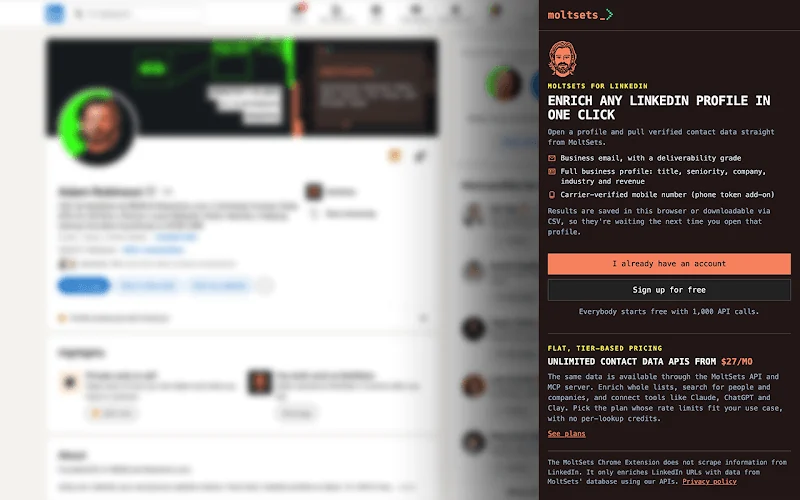
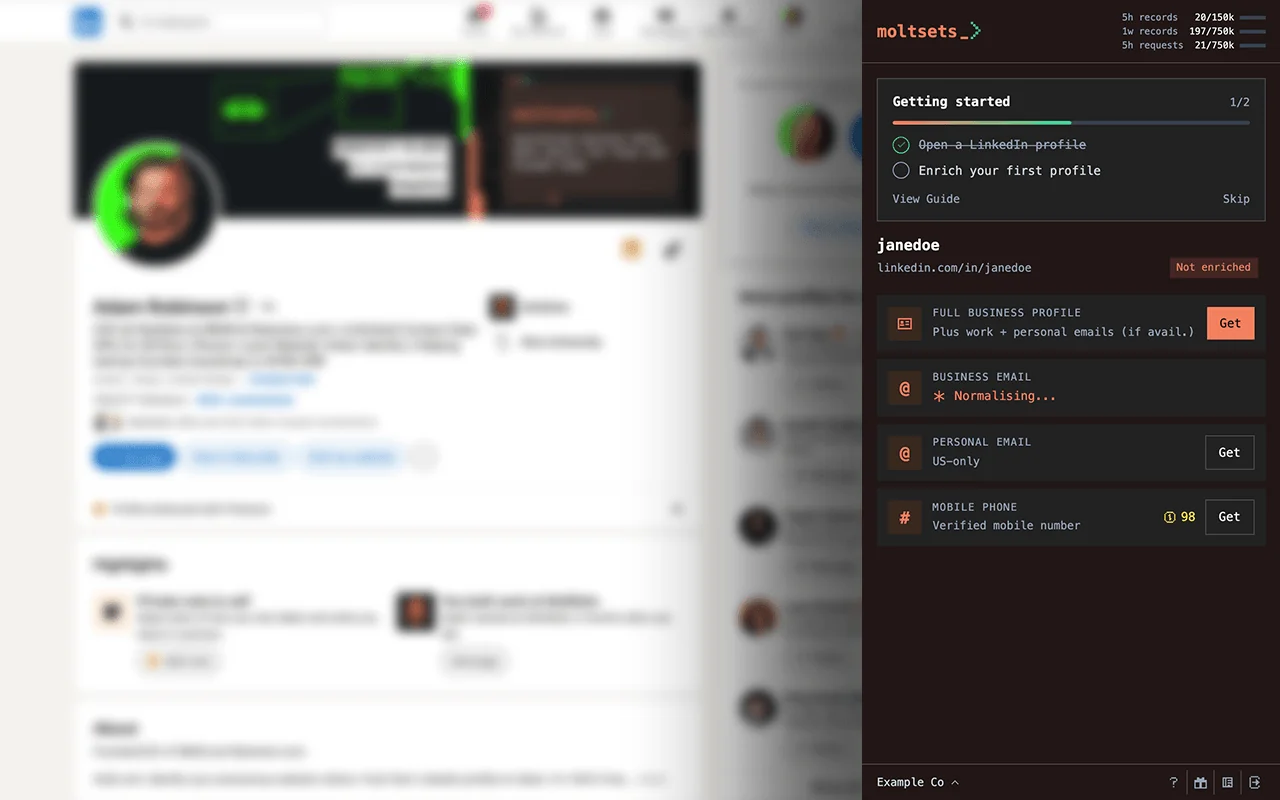
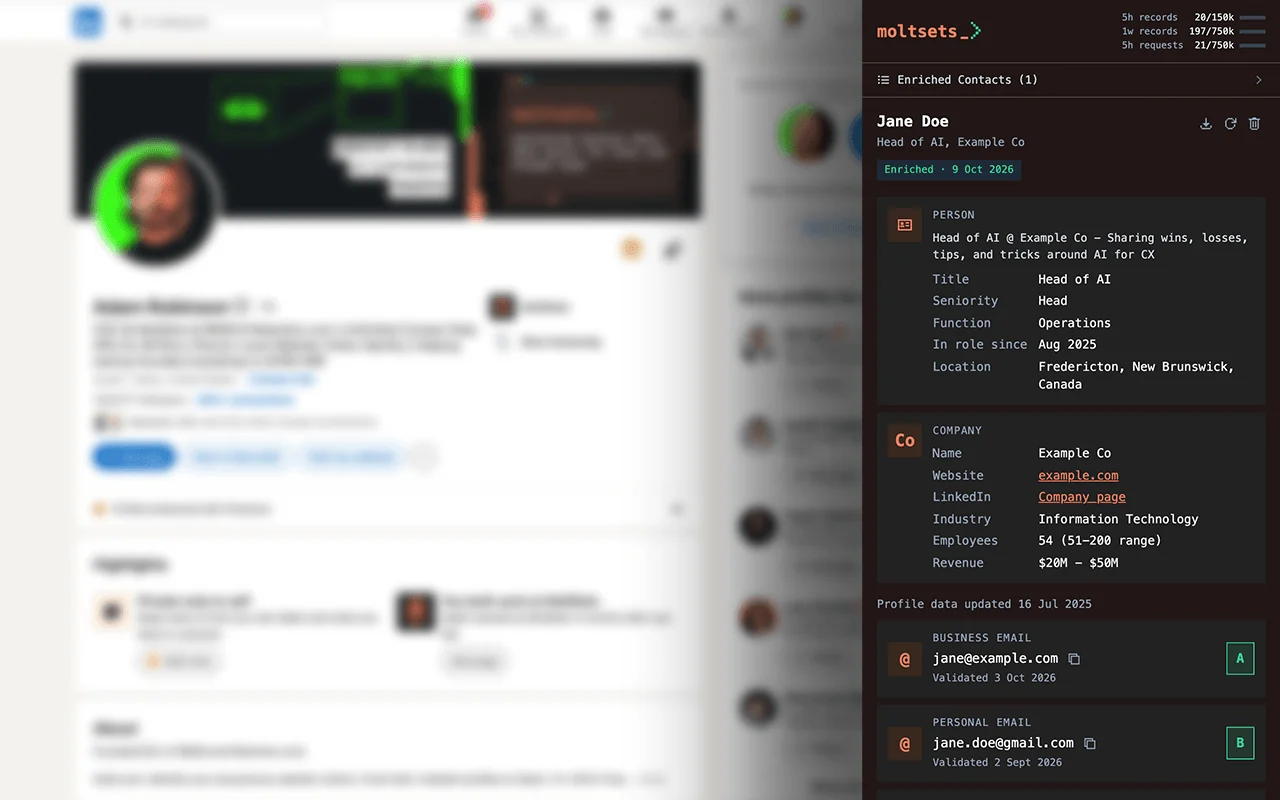
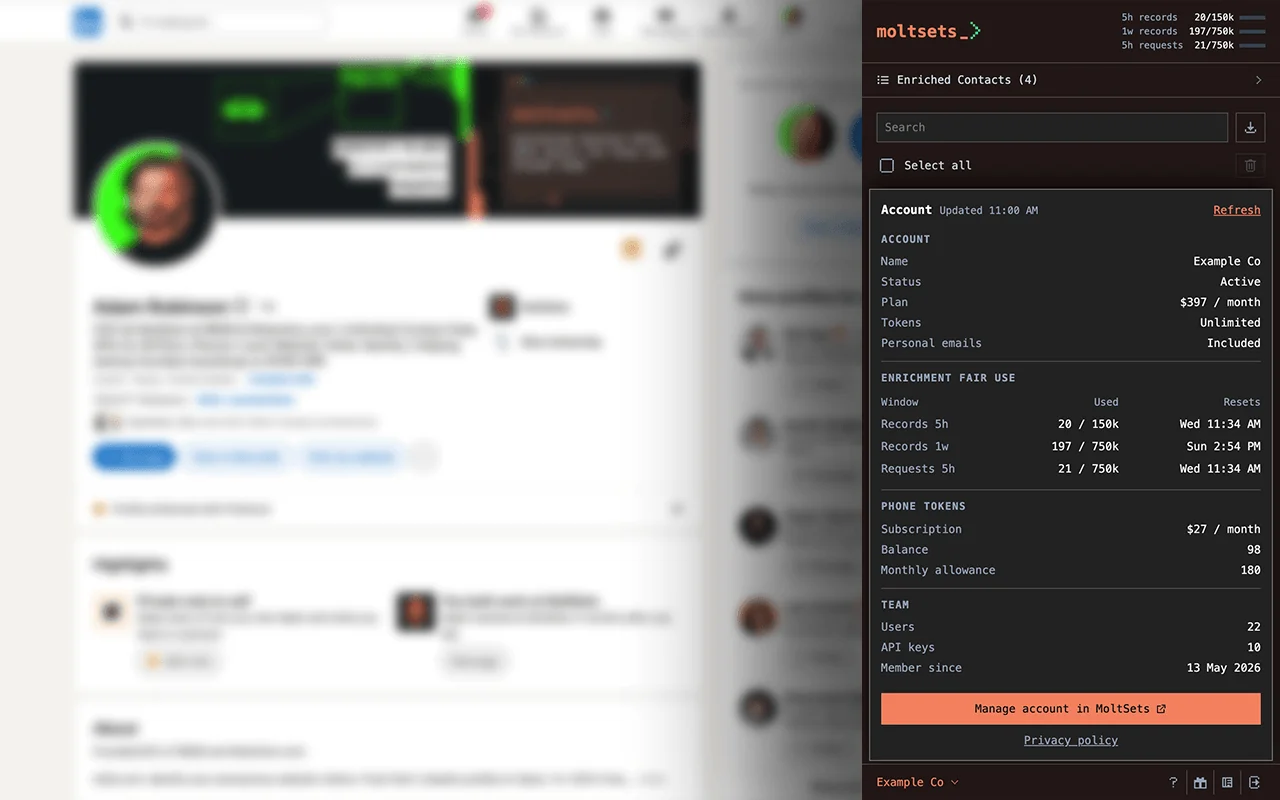
LinkedIn contact enrichment in a side panel
You already prospect on LinkedIn. The extension puts the MoltSets database beside it, so the moment you land on the right person you can get a verified way to reach them.
The panel stays open as you move between profiles, and everything you enrich is saved — come back to a profile and your data is already there.
Four lookups
- / 01Full business profile Name, headline, title, seniority, location, time in role, skills and company details — plus the business email.
- / 02Business email The work email only, with its A–F risk score and last validation date.
- / 03Personal email A personal inbox instead of a work one, for US contacts.
- / 04Mobile phone A carrier-verified mobile number. Never a landline.
Who uses MoltSets for LinkedIn?
01 / Sales reps
Get a sendable email and a direct mobile for the prospect you’re looking at, without leaving LinkedIn.
02 / Recruiters
Reach candidates on a personal inbox or mobile, and keep a list per open role.
03 / Founders
Do founder-led sales from LinkedIn, and push every promising contact straight into your CRM.
04 / SDR teams
Build target-account lists as you prospect, then send the whole list to HubSpot or a Clay table in one click.
05 / Agencies
Prospect for clients by campaign or territory and hand off clean CSVs that import anywhere.
06 / RevOps
Route LinkedIn-sourced leads into Make, n8n or Zapier with a stable JSON payload that never breaks your mapping.
Profile open, contact in your CRM.
-
01 /
Install and connect
Add MoltSets for LinkedIn from the Chrome Web Store, open the side panel and paste your API key — or sign up free from the panel.
-
02 /
Open a profile and click Get
Go to any LinkedIn profile. Pick a full profile, business email, personal email or mobile, and the result appears in seconds.
-
03 /
Save and send
Add the contact to a lead list, download a CSV, or send it to HubSpot, Attio, Clay, Make, n8n, Zapier or any webhook.
Send LinkedIn contacts to the tools you already use
Connect once from the side panel, then send an enriched contact — or a whole list — in one click. No CSV imports, no copy and paste. Sends go straight from your browser to the tool, never through MoltSets, and never use tokens.
-

HubSpot
CRMSend one contact, a selection or a whole list. Matches on email and company domain, so nothing is duplicated.
setup guide → -

Attio
CRMFills empty fields only, so your team’s edits stay put. Every email lands with its risk score.
setup guide → -

Clay
workflow automationDrop contacts straight into a Clay table through a webhook source, ready for the next column.
setup guide → -

Make
workflow automationStart any scenario from a custom webhook — one URL, nothing else to configure.
setup guide → -

n8n
workflow automationTrigger a workflow from a Webhook node, on n8n Cloud or self-hosted.
setup guide → -

Zapier
workflow automationA Catch Hook trigger gets every contact into any Zap.
setup guide → -

Any webhook
webhookAny HTTPS endpoint that takes JSON. The same flat payload every time, with every field always present.
setup guide → -

CSV
exportDownload a contact, a selection, a list or everyone. Opens cleanly in Excel and Google Sheets.
setup guide →
Prospect into lists, send them anywhere
Organise contacts as you go, then hand a whole list to your CRM or workflow. Every webhook send uses the same flat JSON, so your field mapping never breaks.
- Create as many lists as you need — by campaign, territory, account or role
- Put a contact on one list or several
- Search within a list by name, company or email
- Download or send a whole list in one go
- Deleting a list never deletes its contacts
- Lists live in your browser and never use tokens
webhook payload · contact.sent
{
  "event": "contact.sent",
  "source": "moltsets_chrome_extension",
  "linkedin_url": "https://www.linkedin.com/in/sample-contact",
  "full_name": "Sam Sample",
  "title": "Head of Growth",
  "company_name": "Example Co",
  "company_website": "example.com",
  "business_email": "sam@example.com",
  "business_email_risk_score": "A",
  "mobile_phone": "+15125550100",
  ...
}Built to stay out of your way
01 / No scraping
The extension reads only the address of your LinkedIn tab. It never reads page content or changes anything on LinkedIn.
02 / Nothing runs on its own
Every lookup starts with your click. Nothing is sent to MoltSets until you ask for it.
03 / Your data stays local
Keys, saved results, lists and CRM tokens live in your browser, encrypted with your passphrase. Sends go straight to your tools, never through MoltSets.
04 / No tracking
There is no analytics or advertising code in the extension.
What it costs
The extension is free; lookups run on your MoltSets plan. Start with 1,000 free calls, then move to a flat-rate unlimited plan. Mobile lookups use phone tokens on paid plans. Full detail on the pricing page.
free
Try before you commit, no card required.
get started- 1k data calls total
- 100 search records total
- Personal email included
solo
For solo builders and small lists.
get started- Unlimited data
- 500 search records / 5h
- Personal email included
pro MOST POPULAR
For teams enriching at scale.
get started- Unlimited data
- 7.5k search records / 5h
- Personal email included
team
For teams that have outgrown the $97 limits.
get started- Unlimited data
- 75k search records / 5h
- Personal email not included
free — $0 to start
Try before you commit, no card required.
Fair use limits
| Records / 5 hrs | Requests / 5 hrs | Records / week | |
|---|---|---|---|
| Enrichment | 1k | 1k | 1k lifetime |
| Search | 100 lifetime (5 per call max) | 100 lifetime | 100 lifetime |
- Lifetime Data
- 1k lifetime
- Concurrent searches
- 3
- Mobile phones
- Not available
Records are only counted when data comes back; every request counts, hits and misses alike. Windows roll from your first request. Full policies: Enrichment · Search.
Endpoints
Search
-
/search_peoplesearch limits -
/search_companiessearch limits -
/search_linkedin_profilesearch limits -
/search_business_email_by_namesearch limits -
/search_business_profile_by_namesearch limits
Get Valid Emails
-
/linkedin_to_best_emailenrichment limits -
/linkedin_to_business_emailenrichment limits -
/linkedin_to_personal_email_usaenrichment limits -
/linkedin_to_best_personal_email_usaenrichment limits
Get Carrier-Verified Mobile Phones
-
/linkedin_to_mobile_phonenot on this plan
Reverse Lookups
-
/reverse_email_lookupenrichment limits -
/reverse_linkedin_lookupenrichment limits
Get Ad Audience
-
/email_to_maidenrichment limits -
/business_email_to_sha256enrichment limits -
/linkedin_to_sha256enrichment limits
Get LinkedIn
-
/email_to_linkedinenrichment limits
Get Company
-
/ip_to_companyenrichment limits
solo — $27 / month
For solo builders and small lists.
Fair use limits
| Records / 5 hrs | Requests / 5 hrs | Records / week | |
|---|---|---|---|
| Enrichment | 1k | 5k | 5k |
| Search | 500 | 2.5k | 2.5k |
- Lifetime Data
- Unlimited
- Concurrent searches
- 3
- Mobile phones
- Phone token add-on
Records are only counted when data comes back; every request counts, hits and misses alike. Windows roll from your first request. Full policies: Enrichment · Search.
Endpoints
Search
-
/search_peoplesearch limits -
/search_companiessearch limits -
/search_linkedin_profilesearch limits -
/search_business_email_by_namesearch limits -
/search_business_profile_by_namesearch limits
Get Valid Emails
-
/linkedin_to_best_emailenrichment limits -
/linkedin_to_business_emailenrichment limits -
/linkedin_to_personal_email_usaenrichment limits -
/linkedin_to_best_personal_email_usaenrichment limits
Get Carrier-Verified Mobile Phones
-
/linkedin_to_mobile_phonephone tokens
Reverse Lookups
-
/reverse_email_lookupenrichment limits -
/reverse_linkedin_lookupenrichment limits
Get Ad Audience
-
/email_to_maidenrichment limits -
/business_email_to_sha256enrichment limits -
/linkedin_to_sha256enrichment limits
Get LinkedIn
-
/email_to_linkedinenrichment limits
Get Company
-
/ip_to_companyenrichment limits
pro — $97 / month
For teams enriching at scale.
Fair use limits
| Records / 5 hrs | Requests / 5 hrs | Records / week | |
|---|---|---|---|
| Enrichment | 15k | 75k | 75k |
| Search | 7.5k | 37.5k | 37.5k |
- Lifetime Data
- Unlimited
- Concurrent searches
- 5
- Mobile phones
- Phone token add-on
Records are only counted when data comes back; every request counts, hits and misses alike. Windows roll from your first request. Full policies: Enrichment · Search.
Endpoints
Search
-
/search_peoplesearch limits -
/search_companiessearch limits -
/search_linkedin_profilesearch limits -
/search_business_email_by_namesearch limits -
/search_business_profile_by_namesearch limits
Get Valid Emails
-
/linkedin_to_best_emailenrichment limits -
/linkedin_to_business_emailenrichment limits -
/linkedin_to_personal_email_usaenrichment limits -
/linkedin_to_best_personal_email_usaenrichment limits
Get Carrier-Verified Mobile Phones
-
/linkedin_to_mobile_phonephone tokens
Reverse Lookups
-
/reverse_email_lookupenrichment limits -
/reverse_linkedin_lookupenrichment limits
Get Ad Audience
-
/email_to_maidenrichment limits -
/business_email_to_sha256enrichment limits -
/linkedin_to_sha256enrichment limits
Get LinkedIn
-
/email_to_linkedinenrichment limits
Get Company
-
/ip_to_companyenrichment limits
team — $397 / month
For teams that have outgrown the $97 limits.
Fair use limits
| Records / 5 hrs | Requests / 5 hrs | Records / week | |
|---|---|---|---|
| Enrichment | 150k | 750k | 750k |
| Search | 75k | 375k | 375k |
- Lifetime Data
- Unlimited
- Concurrent searches
- 8
- Mobile phones
- Phone token add-on
Records are only counted when data comes back; every request counts, hits and misses alike. Windows roll from your first request. Full policies: Enrichment · Search.
Endpoints
Search
-
/search_peoplesearch limits -
/search_companiessearch limits -
/search_linkedin_profilesearch limits -
/search_business_email_by_namesearch limits -
/search_business_profile_by_namesearch limits
Get Valid Emails
-
/linkedin_to_best_emailenrichment limits -
/linkedin_to_business_emailenrichment limits -
/linkedin_to_personal_email_usanot on this plan -
/linkedin_to_best_personal_email_usanot on this plan
Get Carrier-Verified Mobile Phones
-
/linkedin_to_mobile_phonephone tokens
Reverse Lookups
-
/reverse_email_lookupenrichment limits -
/reverse_linkedin_lookupenrichment limits
Get Ad Audience
-
/email_to_maidnot on this plan -
/business_email_to_sha256not on this plan -
/linkedin_to_sha256not on this plan
Get LinkedIn
-
/email_to_linkedinenrichment limits
Get Company
-
/ip_to_companyenrichment limits
max — $997 / month
Peak throughput for agents running around the clock.
Fair use limits
| Records / 5 hrs | Requests / 5 hrs | Records / week | |
|---|---|---|---|
| Enrichment | 225k | 1.125M | 1.125M |
| Search | 112.5k | 562.5k | 562.5k |
- Lifetime Data
- Unlimited
- Concurrent searches
- 8
- Mobile phones
- Phone token add-on
Records are only counted when data comes back; every request counts, hits and misses alike. Windows roll from your first request. Full policies: Enrichment · Search.
Endpoints
Search
-
/search_peoplesearch limits -
/search_companiessearch limits -
/search_linkedin_profilesearch limits -
/search_business_email_by_namesearch limits -
/search_business_profile_by_namesearch limits
Get Valid Emails
-
/linkedin_to_best_emailenrichment limits -
/linkedin_to_business_emailenrichment limits -
/linkedin_to_personal_email_usanot on this plan -
/linkedin_to_best_personal_email_usanot on this plan
Get Carrier-Verified Mobile Phones
-
/linkedin_to_mobile_phonephone tokens
Reverse Lookups
-
/reverse_email_lookupenrichment limits -
/reverse_linkedin_lookupenrichment limits
Get Ad Audience
-
/email_to_maidnot on this plan -
/business_email_to_sha256not on this plan -
/linkedin_to_sha256not on this plan
Get LinkedIn
-
/email_to_linkedinenrichment limits
Get Company
-
/ip_to_companyenrichment limits
Questions & answers about MoltSets for LinkedIn
Setup, CRM connections and permissions are covered step by step in the extension docs.
It is a free Chrome extension that puts MoltSets enrichment in a side panel next to LinkedIn. Open a profile, click a lookup, and get a verified business email, personal email, carrier-verified mobile or full business profile in seconds — then save the contact to a list or send it to your CRM.
No. It reads only the URL of the profile in your active tab and looks that URL up in the MoltSets database through the MoltSets API. It doesn’t read page content or add anything to LinkedIn pages. Chrome’s permission prompt describes access to linkedin.com broadly, but only the address is read.
The extension is free to install. Lookups use your MoltSets plan: the Free plan includes 1,000 API calls with no card, and unlimited plans start at $27/month. Lookups that find nothing are free, re-opening a profile you’ve already enriched is free, and lists, CSV downloads and integration sends never use tokens.
Yes. The mobile lookup returns a carrier-verified mobile number — never a landline. Mobile lookups need a paid plan with a phone token subscription, and use one phone token per number found.
HubSpot and Attio as CRMs, plus Clay, Make, n8n, Zapier or any webhook that accepts JSON. HubSpot and the webhook integrations take a single contact, a selection or a whole list; Attio takes one at a time. You can also download any list as a CSV.
No. Before creating anything, MoltSets checks your CRM for the person’s email and the company’s domain, then updates the existing record instead. Contacts arrive associated with their company.
Every email has been validated, and comes with its last validation date and an A–F risk score that rates how safe the mailbox is to send to. Emails graded D are never sent to Attio or your webhooks.
Yes. MoltSets for LinkedIn is also on Firefox Add-ons, with the same lookups in the Firefox sidebar.
Google Chrome 116 or later, and a MoltSets account and API key. You can sign up for free from inside the side panel.
Enriching more than one profile at a time?
AI Agents via MCP
Give Claude, ChatGPT, Cursor or any MCP client live access to verified contact data. Ask in plain English; the agent makes the calls.
how it works →REST API
One POST endpoint per tool, one response shape across all of them. Wire verified emails and mobiles into Clay, n8n, your scripts or your product.
how it works →Enrich LinkedIn in one click
1,000 API calls, no card. MoltSets is in public beta — sign up and start calling the API today.